I have been recommending password managers to business owners for close to fifteen years, and I want to start this post by admitting something the security industry usually does not: the case for them just got a little weaker on paper.
In May, Verizon published the 2026 Data Breach Investigations Report, and for the first time in the report’s nineteen year history, stolen credentials are no longer the top way attackers get in. Exploiting unpatched software took that spot at 31 percent of breaches. Credential abuse, as a standalone entry point, dropped to roughly 13 percent.
So why am I writing about passwords now? Because I read that shift differently than the headlines did. Attackers did not stop stealing passwords. They found something even easier for the moment, and they are still using stolen passwords everywhere they work. The same report found that 73 percent of ransomware victims had an infostealer infection or credential leak in the year before their attack. Passwords remain the raw material for the fraud that actually drains small business bank accounts.
Here is the other reason. Of every security control I can put in front of a small business, a managed password solution has the best ratio of protection to cost, and the shortest path to being done. Patching is a forever job. Password management is a project with an end date. That is worth your attention.
What the data says about how passwords actually fail
The problem is not that people pick bad passwords, although some do. The problem is that people pick the same password, or a close cousin of it, everywhere. Verizon’s DBIR team published supplemental research on this last fall, and the numbers are blunt.
When they looked at machines infected with infostealer malware, which harvests every saved password on a device, the median user had only 49 percent distinct passwords across their accounts. Put plainly: half of the average person’s passwords open more than one door.
That reuse feeds an attack called credential stuffing. Criminals take a list of usernames and passwords stolen from one breach and try them, one time each, against thousands of other sites. Verizon analyzed authentication logs from single sign on providers over two years and found that, for small businesses, about 12 percent of all login attempts on a median day were credential stuffing. Not scans. Not bots poking at a firewall. Real login attempts using real stolen passwords, against companies the size of yours.
Why this hits small businesses harder. Large companies have identity teams watching login anomalies. A twenty person firm usually finds out about account takeover when a vendor calls about an invoice that was paid to the wrong bank. The FBI’s Internet Crime Complaint Center logged just over $3 billion in reported business email compromise losses in its 2025 Internet Crime Report, across 24,768 complaints. Compromised email accounts are how most of those started.
A password manager does not fix every one of these. It fixes the reuse problem completely, and reuse is the piece that turns a breach at some retailer you forgot you had an account with into a breach of your Microsoft 365 tenant.
What “password management” means for a business
I want to be specific here, because the phrase gets stretched. Three things get called password management, and only one of them counts.
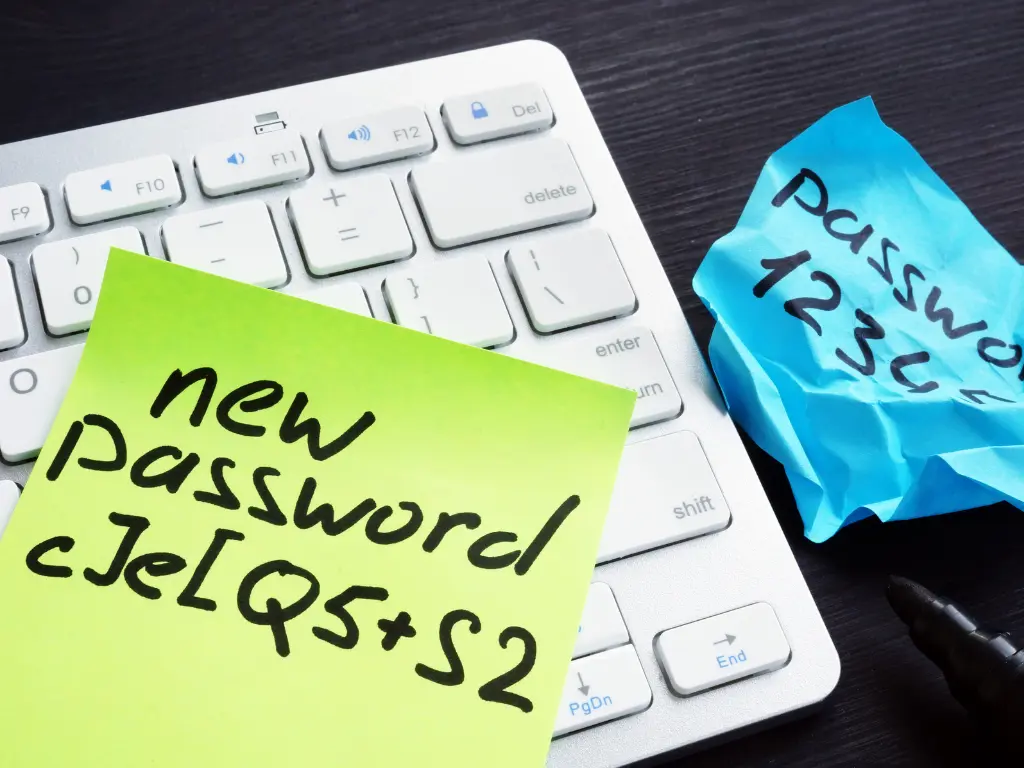
- A shared spreadsheet, a sticky note, or a document called Passwords.docx. This is not management. It is a target.
- The built in password saver in Chrome, Edge, or Safari. Better than nothing for an individual, but it has no admin visibility, no shared vaults with permissions, no way to remove access when someone leaves, and it lives inside the same browser that infostealer malware is written to loot.
- A business tier password management platform. A dedicated vault with per user and shared collections, an administrator console, enforced policies, an audit trail, and integration with your identity provider. This is what I mean for the rest of this post.
The business tier is the one worth paying for, and it is not expensive. Pricing across the major vendors generally lands in the single digits per user per month. I will come back to the math.
The benefits, in business terms
1. Reuse becomes something you cannot do by accident
The generator creates a long, random, unique password for every account and remembers it so nobody has to. That single change is the whole reason CISA lists a password manager as one of its four core recommendations for small and medium businesses, alongside multifactor authentication, software updates, and phishing awareness. Their guidance to business owners is direct: use long, random, unique passwords on all your accounts, store them in a password manager, and work with your IT provider to require the same of employees.
2. Autofill that refuses to fill on the wrong website
This one is underrated. A good password manager fills credentials only on the exact domain the login was saved for. When an employee lands on a lookalike page like rnicrosoft-login.com, the manager offers nothing. That pause is often the moment a person notices something is off. It is not full phishing resistance, and I cover why in the tradeoffs section, but it removes the reflex of typing a password into whatever box appears.
3. Offboarding stops being a scavenger hunt
Ask yourself how many logins your last departed employee knew that were not tied to their Microsoft account. The shipping portal. The payroll provider. The social media pages. The bank’s online banking, which is often shared because the bank charges for extra users. Without a vault, the honest answer is usually “we are not sure.” With one, an administrator removes the person, sees exactly which shared items they could access, and rotates those. That list becomes the offboarding checklist instead of a guess.
4. Shared accounts get an audit trail
Some accounts will always be shared, whatever best practice says. A shared vault lets you control who can see an item, who can only use it without seeing it, and who changed it and when. When something goes wrong, you have a record instead of a room full of shrugs.
5. Fewer lockouts, fewer resets, fewer interruptions
Every reset is a support ticket, a wait, and a few minutes of someone’s day. I am not going to quote you a per reset cost figure, because the numbers that circulate in vendor marketing are unverifiable and mostly come from enterprise help desk studies that do not describe a twenty person firm. What I can tell you from our own ticket queue is that password and lockout tickets drop sharply after a rollout, and that reduction is a real saving for us as well as for the client. I am not neutral here. Fewer of those tickets is good for Harmony MSP’s margins too.
6. It answers the questionnaire
Cyber insurance applications and client security questionnaires increasingly ask whether you use a password manager, whether you enforce unique passwords, and whether you can revoke access on termination. Being able to check those boxes truthfully is worth something, and in some cases it is the difference between a policy and a decline. (See How to Answer Cyber Insurance Renewal Questions Without Voiding Your Policy.)
The math, honestly
I could show you an eye popping return on investment number. Plenty of vendors do. I would rather show you the arithmetic and let you plug in your own figures.
Assume a 25 person business at $6 per user per month, which is a fair midpoint for business plans. That is $1,800 a year. Add a few hours of setup and a short training session and call the first year $3,000 all in.
Now the other side. IC3’s 2025 figures work out to an average reported business email compromise loss of roughly $123,000 per complaint. That average is pulled upward by very large cases, and I do not know the median, so do not treat it as what you would lose. Use a number you believe. Even if you think a compromised email account would cost you $15,000 in fraudulent payments, cleanup, and lost time, that one incident pays for five years of licensing. And that ignores the productivity side entirely.
| Line item | Assumption | Annual figure |
|---|---|---|
| Licensing | 25 users at $6 per user per month | $1,800 |
| Setup and training (year one) | Provider time plus a 45 minute staff session | About $1,200 |
| Password and lockout tickets avoided | Two per month at 20 minutes of staff time, plus provider time | Roughly $800 to $1,500 |
| Single avoided account takeover | Your own estimate; the IC3 average is far higher | You decide |
The point is not the exact numbers. The point is that the cost side is small and fixed, and the benefit side only has to be true once.
The tradeoffs nobody puts in the brochure
If I only listed benefits you would be right to be suspicious. Here is what a password manager does not do, and where it can hurt you.
The vault becomes the thing worth stealing
This is the objection I hear most, and it is legitimate. In 2022, LastPass suffered two linked incidents that ended with an attacker copying backups of customer vault data. The sensitive fields were encrypted, but the vaults were now in criminal hands to be attacked offline at leisure, and users with weak master passwords were exposed. LastPass later settled a class action and was fined by the UK regulator. That happened. Any vendor can have a bad year.
Two things follow. First, the master password is now the most important password in your life, and it must be long, unique, and protected by multifactor authentication. NIST’s own guidance on this is a long passphrase you can remember but nobody can guess. Second, vendor selection matters. Look for a zero knowledge design, a public security architecture document, a history of third party audits, and a track record of clear incident disclosure. A vendor that has never had an incident is not necessarily safer than one that handled an incident well, but a vendor that hid one is disqualifying.
It is not a substitute for MFA, and MFA is not a substitute for it
A password manager stops reuse and weak passwords. It does not stop a session token from being stolen by an adversary in the middle phishing kit, which is exactly what the current generation of phishing services targeting Microsoft 365 is built to do. You need both controls. Verizon’s researchers say the same thing: reuse and missing MFA are the two weaknesses that make credential stuffing work. NIST is explicit that passwords, even well managed ones, sit below phishing resistant authenticators like passkeys and hardware keys in its hierarchy. A password manager is the floor, not the ceiling.
Adoption is a people problem
The software is easy. Getting a bookkeeper who has used the same password since 2011 to trust a generated string is not. Rollouts fail when the owner treats it as an IT install rather than a workflow change. They succeed when leadership uses it visibly, when the first week focuses on the five accounts people touch most, and when someone is available to answer “where did my password go” for a few days. Budget for that, because the license does nothing if the vault is empty.
Browser extensions and the infostealer problem
Infostealer malware targets the same browser your extension lives in. A locked vault is far better protected than a browser’s built in saver, but on a compromised machine nothing is fully safe. Endpoint protection and keeping company credentials off unmanaged personal devices remain necessary. The 2025 DBIR found 46 percent of unmanaged devices in infostealer logs carried corporate logins, against 30 percent of managed ones, which is the clearest argument I know for not letting work accounts live on a home laptop.
Passkeys are coming, and that is fine
You will hear that passwords are dying and passkeys will replace them. Directionally true, and NIST now formally recognizes passkeys as a valid authenticator. But your bank, your state licensing portal, and your shipping vendor will be asking for a password for years. The good news is that modern password managers store passkeys too, so the platform you deploy today is the same one that carries you through the transition.
A note on self-interest: We bundle a password manager into our standard service because it cuts our ticket volume and makes offboarding a ten minute task instead of an afternoon. That serves us. It also serves you. What does not serve you is a provider who deploys the software and walks away, because an empty vault has all of the cost and none of the benefit. If you are evaluating a provider, ask what their rollout looks like after the licenses are assigned.
What to look for if you are choosing one
You do not need a forty item comparison chart. These are the things that separate a business tool from a consumer app with a company logo on it.
- Zero knowledge architecture. The vendor cannot read your vault. Ask for the security white paper and check that it exists.
- Enforceable policies. Required MFA on the vault, minimum master password length, and the ability to block exports.
- Shared collections with granular permissions. View, use without viewing, edit, and manage should be separate rights.
- Identity provider integration. Provisioning and deprovisioning from Microsoft Entra or Google Workspace so a termination in one place terminates access everywhere.
- Breach and weak password reporting. A dashboard that shows reused, weak, and known compromised passwords, so you can measure improvement.
- Administrative recovery. A way to recover an employee’s vault if they forget their master password or leave, without the vendor being able to do it for you.
- Passkey support. So you are not migrating again in three years.
- Disclosure history. Read how the vendor handled its last security incident. Every mature vendor has had one.
The one thing to do this month
If you take a single action from this post, make it this: get a business tier password manager deployed and start with the accounts that can move money. Online banking, payroll, merchant processing, and the email accounts of anyone who approves payments. Generate new unique passwords for those, turn on MFA for each, and put them in a shared vault with only the people who need them.
That is a two hour project for most small businesses, and it closes the door that credential stuffing and business email compromise walk through. The rest of the accounts can follow over the next few weeks. Perfection is not required. Uniqueness on the accounts that matter is.
Patching will still be there tomorrow. So will phishing. But this one you can actually finish.
If you would like a second opinion
If you are not sure whether your current setup counts as password management, or you want someone to look at how shared logins and offboarding are handled in your business today, we are glad to talk it through. No pitch required. Call Harmony MSP at (407) 720-6540.
Frequently asked questions
Is the password manager built into my browser good enough for a business?
Not for a business. Browser savers have no administrator visibility, no shared vaults with permissions, and no way to remove a departing employee’s access to shared logins. They also live inside the same browser that infostealer malware is designed to loot. A business tier platform solves all three problems for a few dollars per user per month.
If a password manager can be breached, why use one?
Because the alternative is worse. Without one, your passwords are already spread across dozens of sites, half of them reused, and any one of those sites can leak them. A well designed vault encrypts everything with a key derived from your master password, which the vendor never sees. Choose a zero knowledge vendor with a clean disclosure record, use a long master passphrase, and require MFA on the vault.
Does a password manager replace multifactor authentication?
No. A password manager stops reuse and weak passwords. MFA stops an attacker who already has the password. Modern phishing kits can steal MFA session tokens, which is why phishing resistant methods like passkeys and hardware keys are the next step up. You need both controls, and the password manager is the floor.
How long does a rollout take for a small business?
The technical deployment takes a few hours. Getting the accounts that move money into the vault with unique passwords and MFA is a two hour project. Migrating everything else usually takes a few weeks of light effort. The part that takes real attention is helping staff through the first week.
Sources
- Verizon, 2026 Data Breach Investigations Report press release (May 19, 2026)
- Verizon, 2026 Data Breach Investigations Report
- Verizon, Additional 2025 DBIR research on credential stuffing
- Verizon, 2025 Data Breach Investigations Report
- FBI Internet Crime Complaint Center, 2025 Internet Crime Report
- CISA, Require Strong Passwords (guidance for small and medium businesses)
- CISA, Use Strong Passwords (Secure Our World)
- NIST, SP 800-63 Digital Identity Guidelines FAQ
- NIST, SP 800-63B-4 Digital Identity Guidelines: Authentication and Authenticator Management
- LastPass, Security Incident Update and Recommended Actions (March 1, 2023)
A note on statistics: where a figure is an average or a median, it is labeled as such above. Vendor claims about help desk savings were deliberately excluded because they could not be traced to a verifiable study that applies to small businesses.